

Search K
Appearance
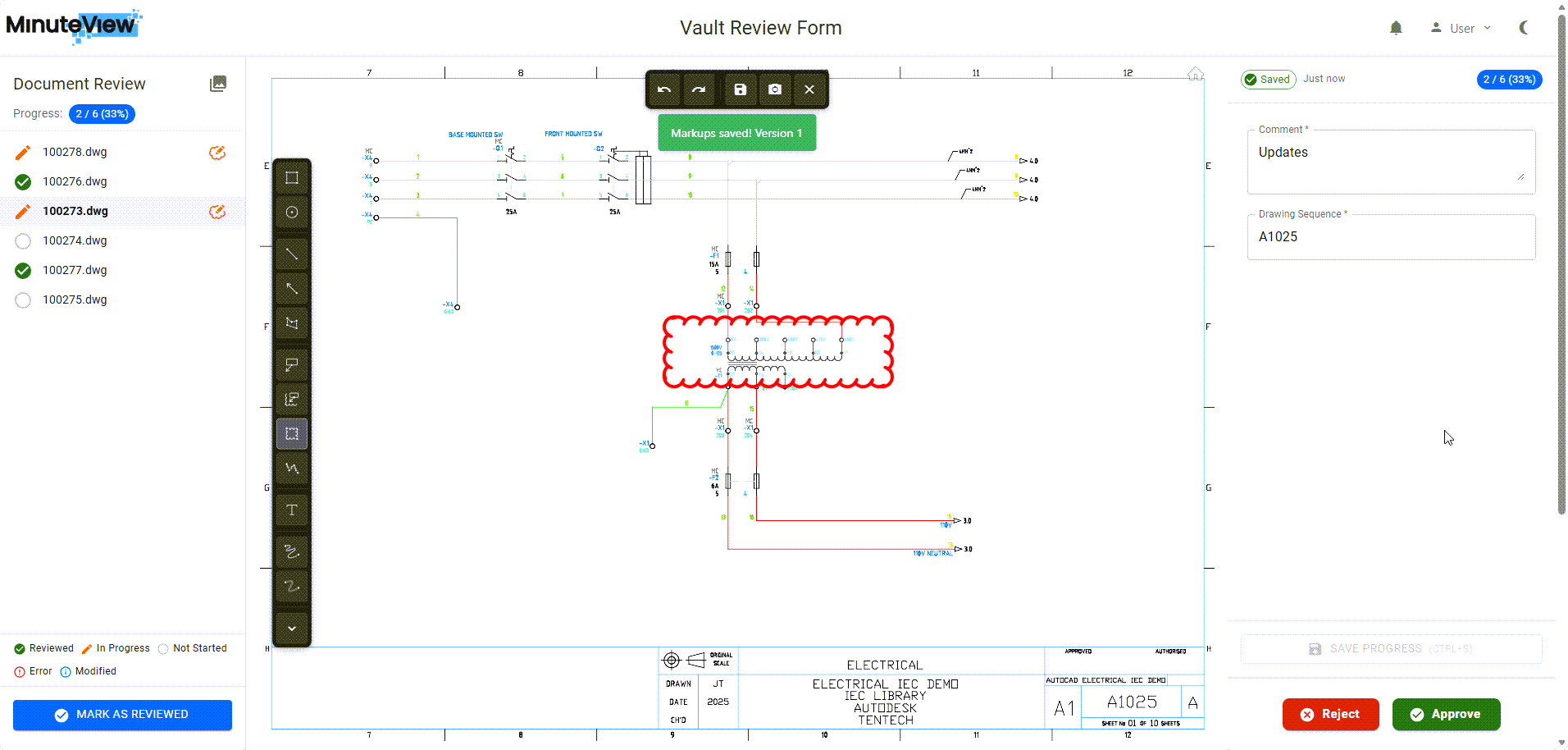
Minute Capture is MinuteView's Human-in-the-Loop review and interaction system. It enables structured review, approval, and submission processes across engineering data, documents, and records—while maintaining deterministic outcomes in environments where AI and automation alone are insufficient.
Unlike traditional workflows, Capture introduces an explicit human interaction point that can be triggered by:
Capture ensures traceability, accountability, and controlled decision-making at critical stages of your engineering workflows.
Configure templates for simple submissions or multi-stage approval processes with approve/reject workflows.
Built-in markup and annotation tools allow reviewers to provide clear, visual feedback directly on documents and drawings.
Works seamlessly with:
Control who can create, view, approve, and reject captures based on role assignments.
Every action is tracked and timestamped, providing complete traceability for regulated engineering environments.
Ready to start using Minute Capture? Begin with our Get Started guide to understand core concepts and when to use Capture in your workflows.
Understand Capture's core concepts and when to use it versus traditional workflows.
Learn how to create and configure Capture Templates, set up security, and integrate with other systems.
Step-by-step instructions for using the Capture Inbox, reviewing artifacts, and completing submissions.
Technical reference for capture states, submission types, and system behaviors.